JS13k 2026 post-mortem
Another JS13k is done. This was the fourth time that I participated (2020,2021,2024,2026).
Last autumn me, my son and wife played Doom I & II plus Hexen and Heretic on the Xbox which inspired me to do a FPS game this year.
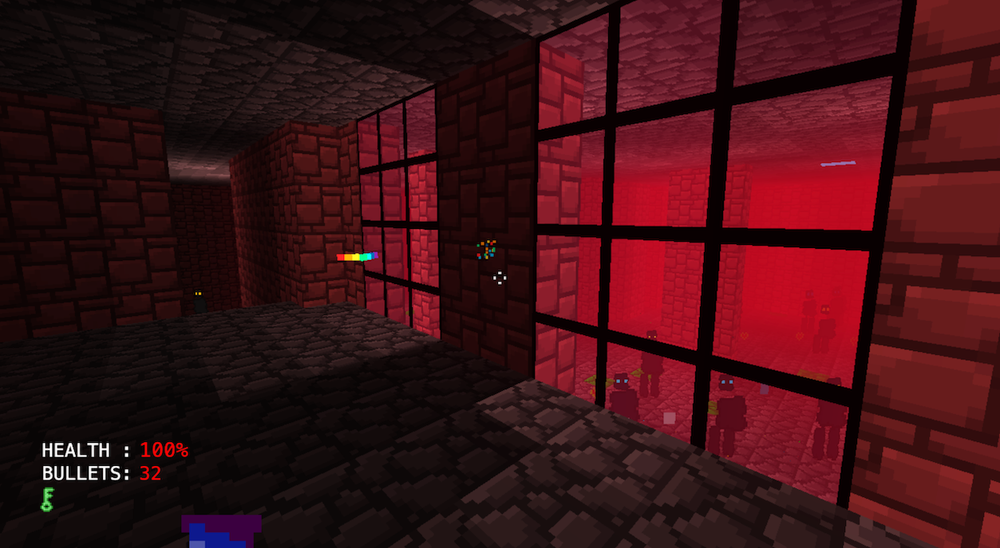
I already planned for an FPS game and when the theme was released I first thought that this will not be a good theme for an FPS game but I spend some time thinking about using a unicorn horn as a weapon and quite quickly got the idea of making a rainbow into a weapon as well making it a boomerang that would bounce around the walls and target enemies. Maybe not a 100% implementation of the theme but I did go with it anyway.
I did already prepare a bit with a 3D-template which was a collection of the 3D-code I wrote for my games in 2020 and 2021. I did also reuse my little level compiler that I also wrote and used in 2020 and 2021 but apart from that the rest of the code was written during the month of the competition.
Unfortunately one week into the development one of my eyes started to hurt and since I had spent a lot of time and not getting enough sleep I thought it was my body doing another round of burned-out symptoms. I went to the ER and they found a small damage on my cornea. I had reduced vision and a bit of fever and I thought that this was game over for finishing the game this year. Luckily the cornea heals quickly and I was back on track after a few days.
Like I wrote above I spent a bit too much time on this. I would guess about 3 hours each day and with a few days removed when I was sick my guess would be about 80 hours in total or so but I had so much fun. Testing out some crazy ideas that actually turned out great. The only thing I'm not fully happy with is the path finding. It works ok but sometimes the enemies gets stuck. My original plan was to have the enemies static and the path finding was added not long before the deadline.
Light system
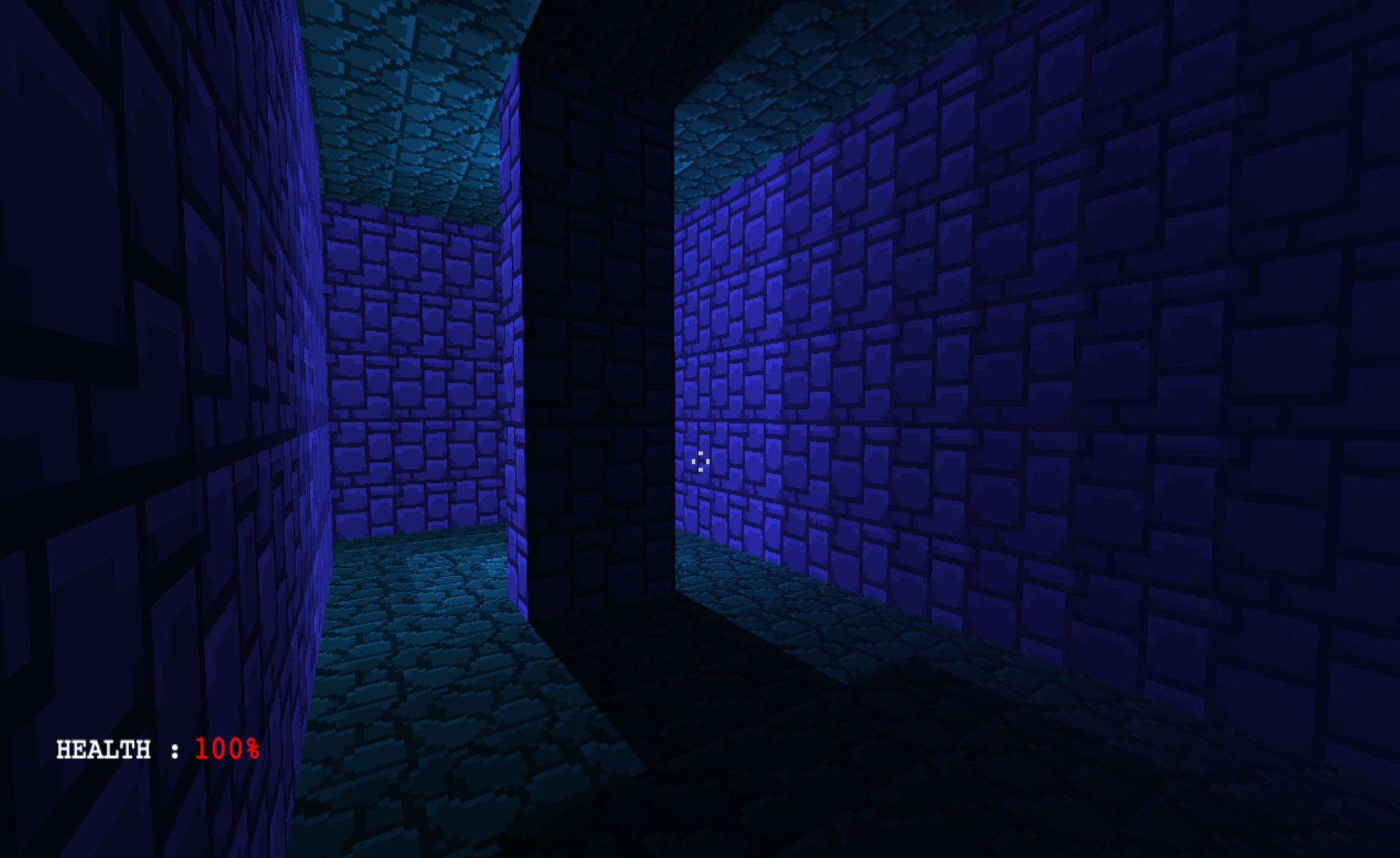
Lights and shadows are always something I really like to implement. The feeling when the idea actually works and it's visible on the screen is great.
In my 2020 dungeon crawler game I used basic flood fill of light. Looping trough all level tiles and spreading the light which mean that light would shine trough corners and into corridors.
This time I decided to try to shoot rays around every light source and follow each ray until it hit a wall or something else that would block the light. With this system I got some really nice shadows. The tile resolution is quite low so there are a few scenarios where the light will shine trough a wall but in the end it turned out quite good. Not perfect but good enough for a 13k game.
To shoot the rays I used the Bresenham's line algorithm which calculates all the points in 2D-space that a line from Point 1 to Point2 crosses. When a wall is hit I just cancel that ray. Yes 2D-space. Even if this is a 3D-game most of it is in 2D and the 3D is just "faked". The lights never decays moving upwards on walls.
generateLight(x,y,distance,lightStrength){
        var s;
        for(var i=0;i<6.28;i+=.01){
            var points=MathUtil.bresenham(x,y,x+Math.sin(i)*distance,y+Math.cos(i)*distance,distance),light=lightStrength;
            for(var point of points){
                light*=.74;
                if(!(s=this.getStructure(point.x,point.y))||s.blocksLight())break;
                this.setLight(point.x,point.y,light)
            }
        }
    }
WebGL shaders
First of all the fog. This is an old but very effective "trick" to generate fog in OpenGL/WebGL using shaders. Basically the further away a pixel is from the camera the more mixed the pixel colour will be with a fog colour. The calculation is easy done since the vertex Z-value can be used and is accessible in the vertex shader. Parts of it is explained in this blog post https://www.geeks3d.com/20100228/fog-in-glsl-webgl/
Apart from that I wanted just some tiny flashing lights and it's done by feeding the current time into the shader and then use a few different sinus calculations to slowly rise and fall in various combinations to generate the small change in light.
In the original idea I wanted some of the light sources to flicker but I had to recalculate the mesh and it turned out to be quite aggressive on the FPS. Now afterwards I should probably just had to change the light value which is a separate GL-property which should have been more effective instead of recalculate the whole mesh.
I also do the black magic classic 3D matrix calculations in the shader this time instead of having the CPU and Javascript to do it. Turned out quite good actually and saved me some space to avoid having Matrix-code in Javascript or the need to use the builtin DOMMatrix which apparently are quite slow according to Internet.
Monsters are not static
For most of the development the monsters (called Darkness) was static. Just standing and shooting without moving. Then I got the idea of using the Bresenham line algorithm again for this too (I'm using it for creating the lights and to check if the player is visible or not for a monster)
Each time the player characters changes tile a bunch of rays are shot out from the player and for each tile it crosses the value is going up. If a wall is hit the ray is canceled. A debug view looks like this:
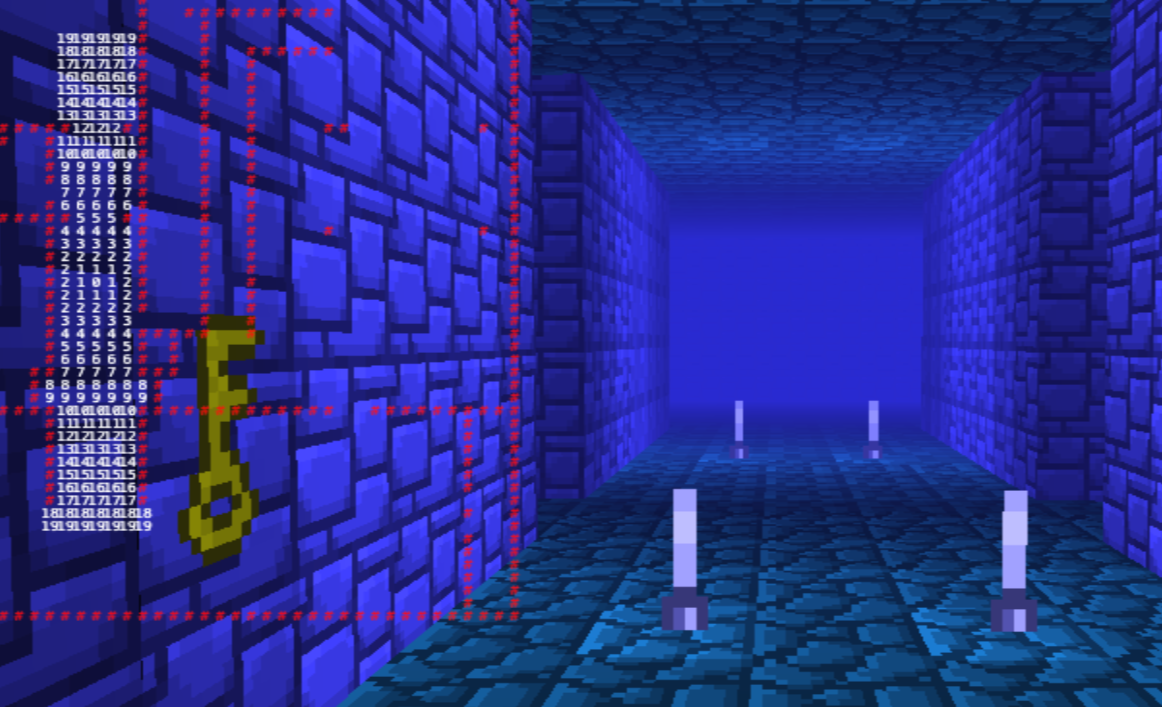
The player in the middle with the value 0 and for each tile the number is increased.
When a monster is in range and can see the player (no wall blocking) it will read this map of values from the player and check for each 8 directions which is the quickest way (smaller number) than the current tile and moves to it, and continues like this moving closer to the player.
It's not perfect and it just looks one step at the time instead of always calculate all possible paths and select the one that cost less. But it makes the enemies seem a bit intelligent and dynamic. Unfortunately the monsters gets stuck at a room entrance due to how the current position is calculated, a math issue that I never really solved but I was also a bit fed up with the game development at this point.
Y-position
Yes the 3D is faked, or at least the sense of gravity. The player character is always stuck to the floor. When I added the small stairs and platforms I thought I would end up in some crazy math problem with lots of weird corner cases but actually it turned out quite good. Since I'm using AABB-collisions I just do a check if the structure hit is a floor and I also check if it's higher than the player position. If it is the player is just moved up and stuck to that position. The same when moving downwards.
At first I only had four of these stairs and platforms but when I created Level 3 I extended it to eight heights.
Moving up and down became quite jerky but I left it like this because "it's just a 13k game" but one night I got the idea that instead of making the player slowly rise or fall I could just delay the camera a few ticks. So that's actually what is happening. When you move up or down a stair the player is still "nailed" to the height but the camera is slowly moving down or moving up.
Level design
The game is 3D but the levels are 2D. Just a grid of X * Z tiles. Each level has a custom height which is just how far up the wall reaches. The stairs and the platforms are also 2D where the player instantly gets nailed to the Y-position.
To design the levels I was using Libresprite drawing pixels on a 64x64 pixel image. White are walls, red are enemies, one color of green is a key and another color of green is a green door and so on. If nothing is placed on the image that means it's a floor.
One ugly thing I had to do to solve the issue with "how can I have a floor and an item in the same tile"? Well for most of the time the floor is at position 0 but since I did build floors with different heights I can't just put a floor with height 0 when an item is placed. So to fix this I added into the level building to check the tile to the left and use the floor height on that tile. It's a hack and I did fall for it a few times where items didn't show up.
So this is how level 1 looks like:
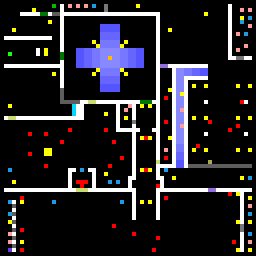
To save space I don't draw the outer walls. Those are done with some simple code when the level is generated.
But an image like this takes up about 1.5k (might be able to squeeze it down a bit further with tiny-png and similar services and tools) but there is another problem I encountered before. When reading the RGB-value of an image (to transfer the image to a playable level) some browser might differ in the colour values and suddenly a wall or entity is missing. So instead of shipping the png file I'm compiling the level to a long text string that I'm including into the html file: https://github.com/js13kGames/rainbow-ricochet/blob/main/levelcompiler/index.js
now the level file is suddenly 4k instead of 1.5k but zip takes care of this and will compress it really small.
The rainbow boomerang
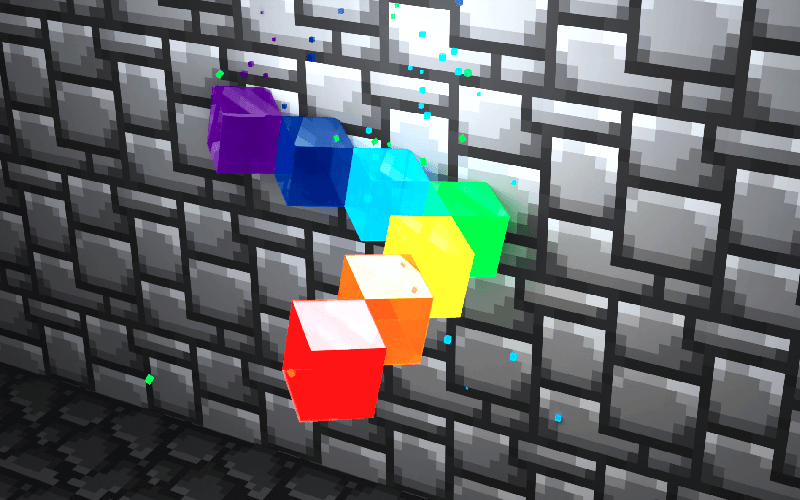
On level two the player will get their hands on the rainbow boomerang. Now afterwards it might have been a bad idea to put it at level 2 because most players will spend a few minutes and maybe not even finish level 1 and never see the rainbow boomerang.
It might look like there is a lot of math involved to get it smash into walls and bounce to a new direction but the math is very simple. First of all I have a classic AABB (Axis Aligned Bounding Box)-system that checks if an entity does collide with another entity or a structure in the level. When this happens a simple onCollision()-method will be fired.
So when the rainbow boomerang hits a wall:
this.direction.x = -this.direction.x;
this.direction.z = -this.direction.z;
it will just reverse the direction. I thought at first I needed more code but was surprised that my "let's see if this works at all" worked 100% correct.
Later on I added a small sensor class that will "collide" with enemies around the rainbow boomerang but instead of hitting them the list of enemies are sorted and the rainbow boomerang will travel directly to the closest enemy and then continue bouncing around enemies a few times.
Returning the rainbow was tricky at first because it would be stuck behind corners. In the end I just made the rainbow to ignore collisions on it's way back and it will travel trough walls to get back into the player hands.
Compress or die!
The rule for JS13k is to fit everything into a 13k zip-file. Writing verbose code is ok because tools like terser will compress it down and uglify it. In 2021 a black magic tool called Roadroller entered the chat and suddenly 1.5k more was reduced. Zipping the file is of course another big tool and finally advzip and ect which can remove some more overheads from the final zip file.
Finally web services like tiny-png and compress-or-die can squeeze down the texture image resources a lot too.
Those tools have been in my and most other js13k devs for a long time.
This year I hit the 13k limit and had a few more things that I wanted to add. I was almost ready to drop a level to gain more space. But I decided to give Google Clojure compiler a test. It's been on JS13k resource page all the time but previous years it has given me errors and I did always give up on it.
Some of the problems I had was solved by using the externs cli switch which tells the compiler to ignore certain variables not available in the js-file. And to my surprise my code went down from 13280 bytes to 12880 bytes. Doesn't sound much but is huge when it comes to JS13k. As a test I added terser after the google closure step and another 80 bytes gone. But it didn't end there. I had a few verbose flags given to the compiler that I removed and in the end Google Closure Compiler helped me go from 13280 bytes to 12685 bytes.
With this number of bytes I was able to add in some simple path finding for the enemies and a few more features.
Two days before the deadline burntcustard wrote on the JS13k-Slack that he had forked the already black magic roadroller tool and adding some more black magic to it. I tried it and boom again, from 13299 bytes to 12984 bytes.
My final compilation pipeline become this (no fancy build system, just a plain old bash script):
# Transform ES6 modules into one long file
rollup g.js --format cjs --file bundle.js


# Google Closure Compiler that optimize the syntax, removes unused code, minifies and uglifies variables
closure-compiler --compilation_level ADVANCED --env BROWSER --externs ../closure-externs.js --js bundle.js --js_output_file gc.js

# Terser does the same but not as aggressive as Google Closure Compiler. This saved another 50 bytes
terser gc.js -o g.js --compress passes=3 --mangle --mangle-props --timings --toplevel --module

# burntcustard fork of roadroller with optimizations (the -Z values and -S0 values comes from leaving roadroller running for an hour or so with the -O0 option.

/opt/homebrew/lib/node_modules/roadroller-bc/cli.mjs --zopfli -M1000 -D -Zab17 -Zlr2737 -Zmc3 -Zmd130 -Zpr16 -S0,1,2,3,5,7,13,17,42,201,309,338 g.js -o ./roadroller.js

zip -9 -r ../dist.zip *
advzip -z -4 ./dist.zip
ect-0.9.5 -strip -9 -zip ./dist.zip
AI
I'm one of those "old time developers" that are amazed of how far we have gotten with AI and that AI can be a good tool but also being depressed when someone can just ask an AI "create a game with rainbows and unicorns in less than 13k" and boom it's done and the developer have no idea how the code works and didn't spend years doing game development and getting a feel for it and knowing which techniques and math to use for different situations.
I didn't use much AI to develop this entry. I asked ChatGPT a bit about a few math questions I had that I didn't have enough knowledge to solve.
A few times I looked at my code and thought "there must be a nicer and smaller way to do this in Javascript" and ChatGPT did off course have a solution and I learned a few things about Javascript thanks to the answer it gave me.
For the monsters path finding I tried to use ChatGPT and it was very confident about the solution and it was really trying to stay within the size limits and did understand about terser and minification and all that. But the code didn't really work. The monster would move in weird ways to reach the player and it never found a way to fix it. I ended up writing it myself instead.
Most game thumbnails are created with AI and they more or less look the same (yes we all have the same theme so it's not that much of a surprise). I spent an hour or so in Blender to create my thumbnail and cover art.
So I'm carefully optimistic about AI in development but a bit depressed when the JS13k-community has transformed from code golfing and optimisations 100% done with human brains to a lot of entries to be vibe coded entirely with AI.
For me doing JS13k is the opportunity to sit down and write code, think and improve my knowledge of Javascript, WebGL and game development, discuss various code problems and size optimisations at the JS13k-Slack channels. It's not about mass produce a bunch of entries in a few days, at least not for me.
Acknowledgements
Isadu for wall and floor textures.
Frank Force for ZzFX
burntcustard for Roadroller optimizations
Andrzej Mazur for organizing JS13k every year! :)